Never have to remember your to-dos again.
Built for tech operators and teams that ship fast.PathRank turns a live meeting into a personalized workflow for every person. Ready the moment you finish your meeting.

Everyone else stops at notes. PathRank takes it the last mile to done.
Note-takers transcribers and LLMs all stop at an artifact like a summary a transcript or a list. PathRank captures input three ways all converging into the same personalized ranked workflow.
Live transcription
- On-device transcription
- A workflow for every member
- No paste and no other app
PathRank Solo Session
- Long-press and talk
- A workflow in seconds
- Captures voice directly
Paste
- Drop in notes or a summary
- Ranked into a workflow too
- An option never required
It all converges into a personalized ranked workflow covering what to do in what order and by when with the lead seeing team progress at a glance.
After the meeting can you see who's actually moving?
PathRank turns a live meeting into a personalized workflow for every member and gives team leads live visibility into who is actually executing.
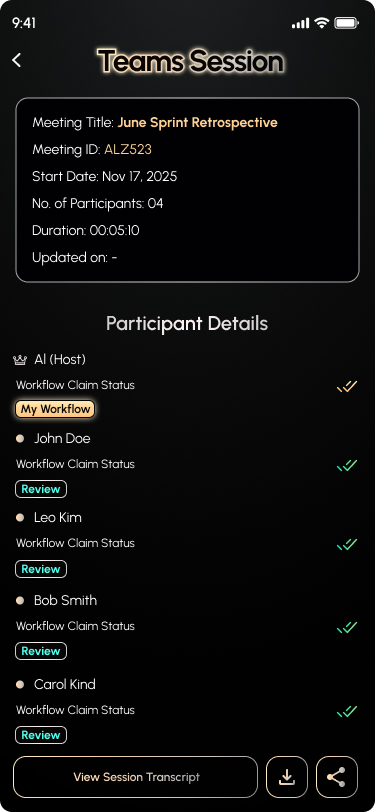 Every member leaves with their own ranked workflow.
- Nothing gets dropped between meetings.
- See execution without micromanaging.
- The whole team onboards from one link.
- Every member leaves with their own ranked workflow.
How do I turn a meeting into action for my whole team?
Three steps all built in. PathRank captures the meeting itself and turns it into a ranked workflow for every person then shows you who's executing. No paste and no other app required.
1. Transcribe your meeting live
- On-device transcription
- Up to 8 members per session
- Nothing to paste required
2. Everyone gets a workflow
- Real action items extracted
- A workflow for every member
- Zero hallucinated tasks
3. You see who's moving
- See progress in real time
- Nothing slips through
- No micromanaging needed
Turn any meeting into everyone's personal workflow.
PathRank Teams transcribes the room, then hands every participant their own ranked workflow. Hosts get an admin view of the whole team's progress.
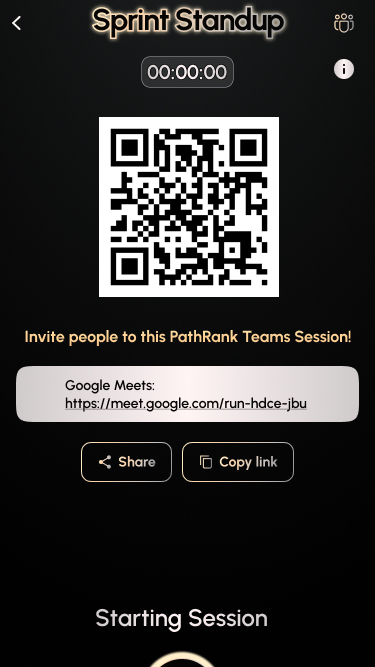
Join by QR or Code
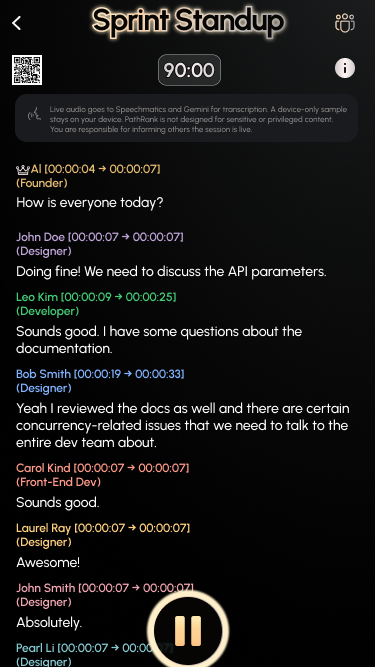
Live On-Device Transcription
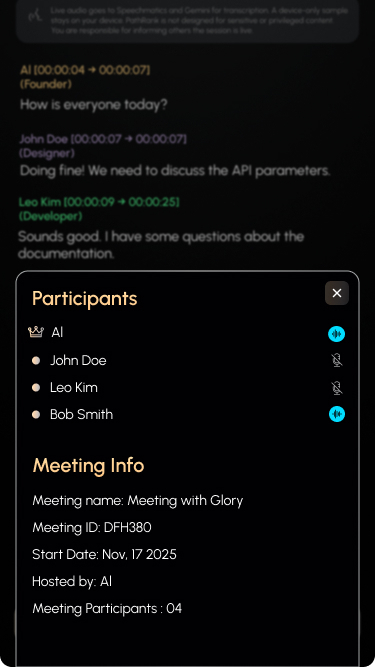
Everyone In One Session
Host Sees Every Workflow Claim
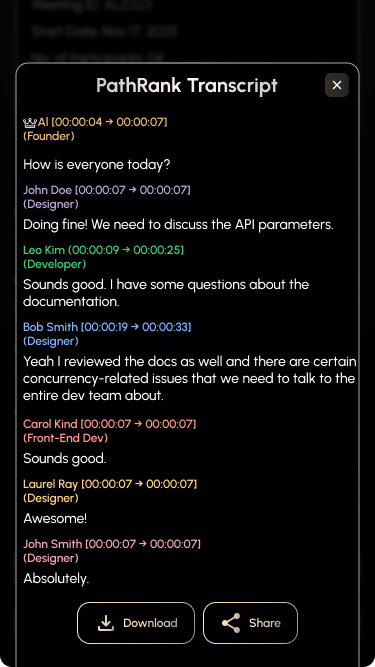
Single Source of Truth Transcript
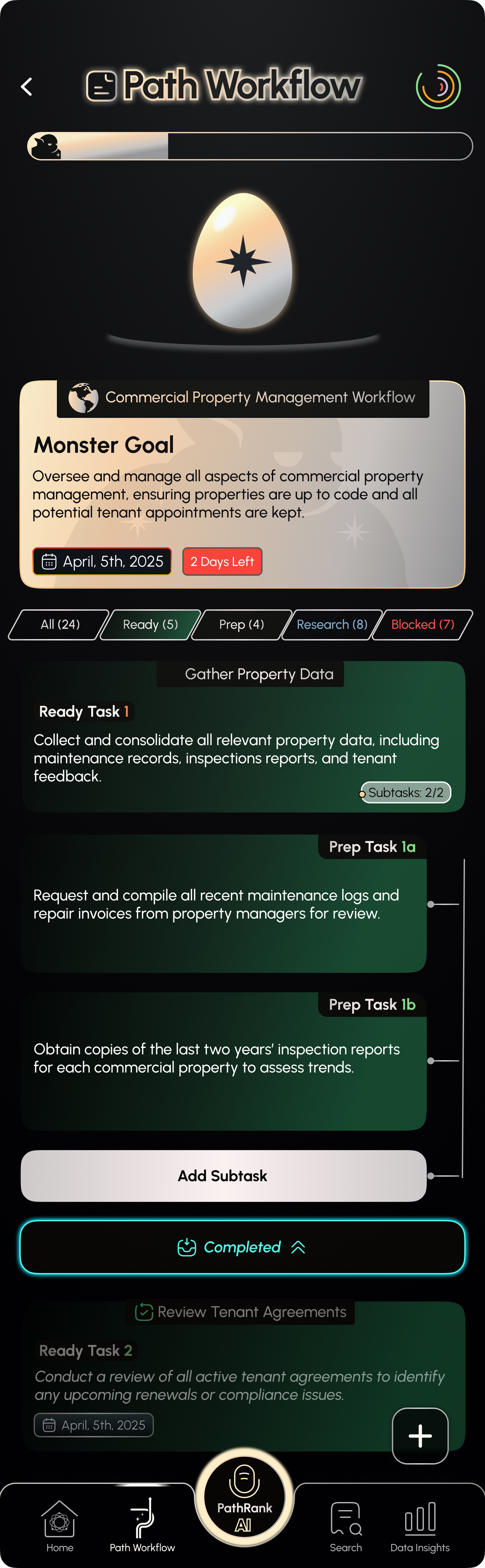
Your Own Ranked Workflow
PathRank Solo Session turns your voice into a ranked workflow
The same last-mile engine for one person. Capture your own thinking by voice and get a ranked plan back with no paste and no other app and never just notes.
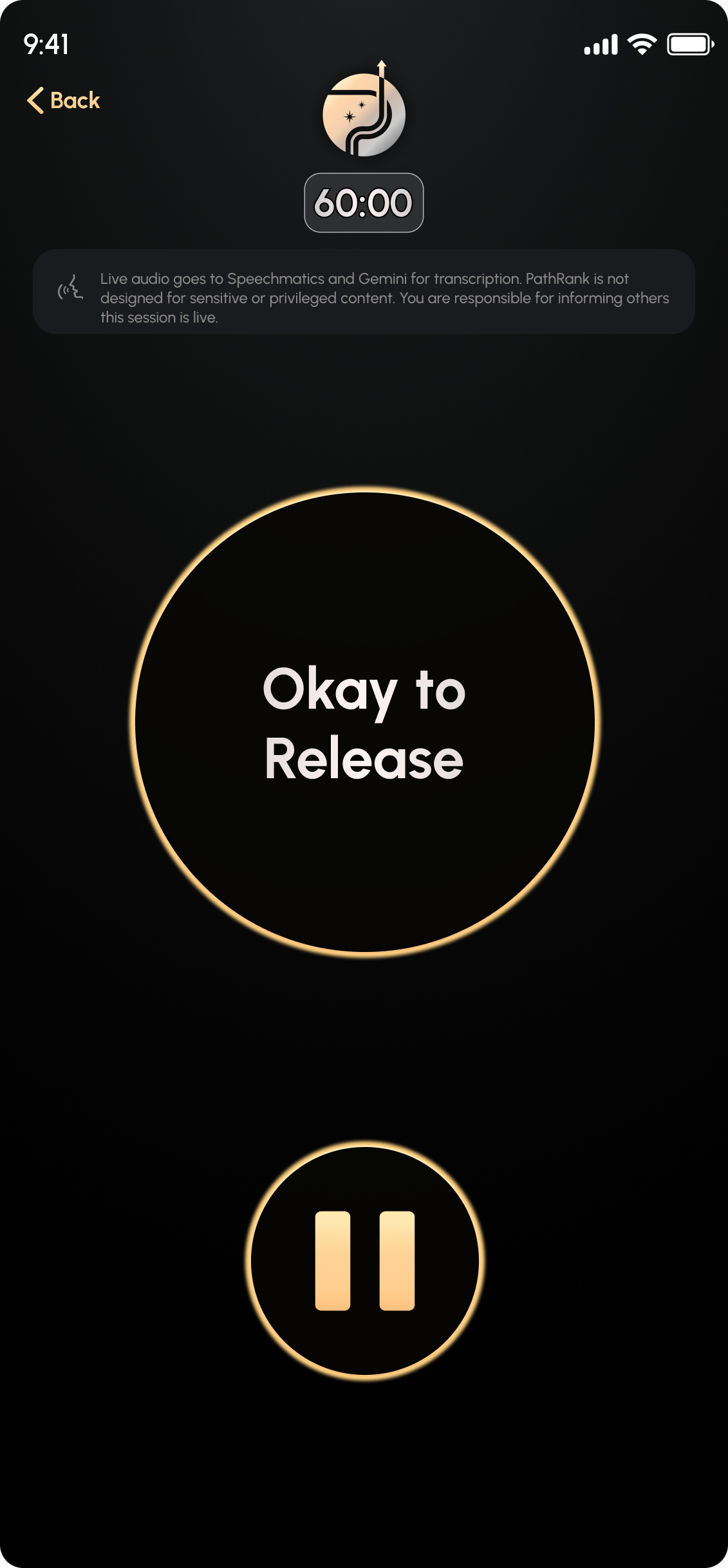
Long-press the PathRank AI button
One press starts a Solo Session. The gold ring opens and the timer begins and PathRank is listening with no setup and no other app.
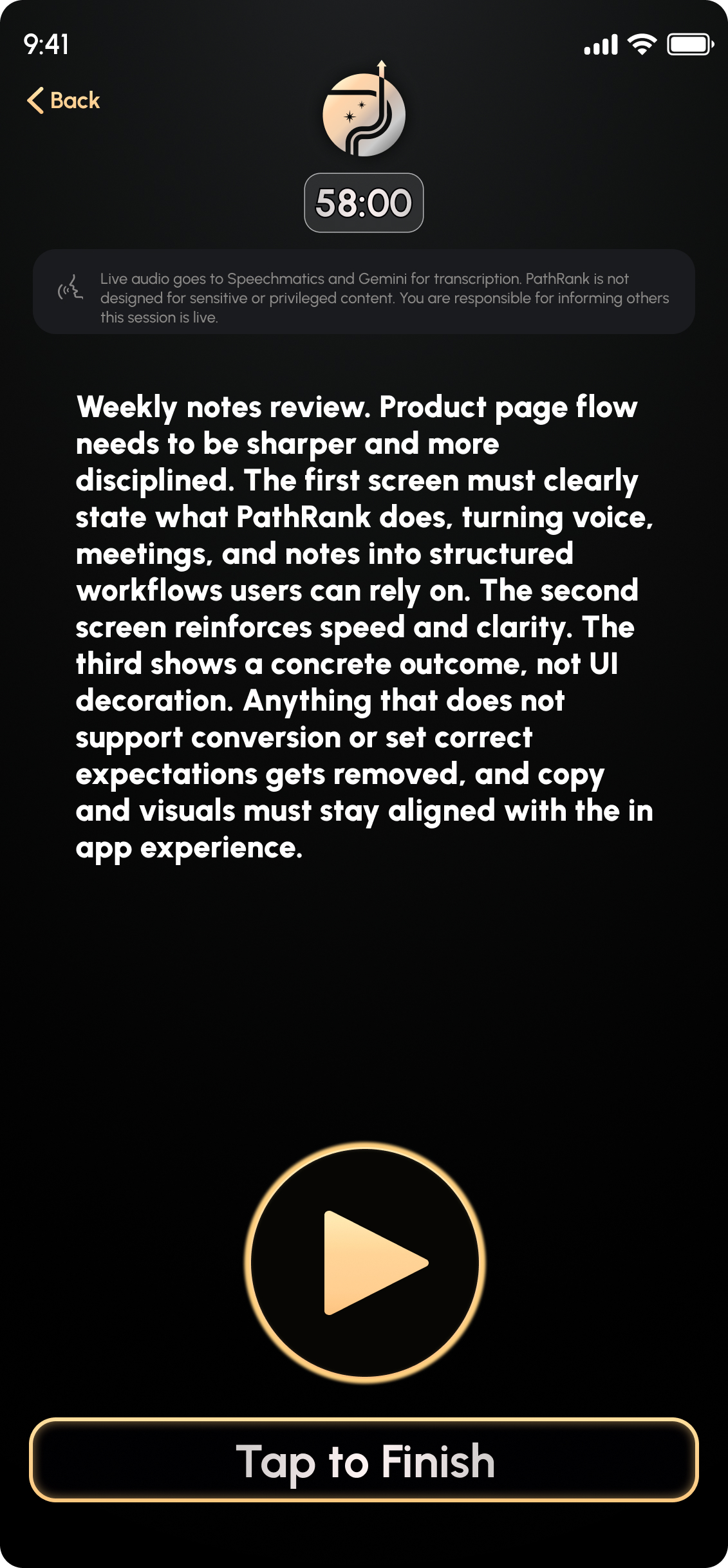
Talk it out up to the session cap
Speak naturally for as long as you need anywhere from 60 seconds to 60 minutes. Your voice is captured directly and transcribed live.
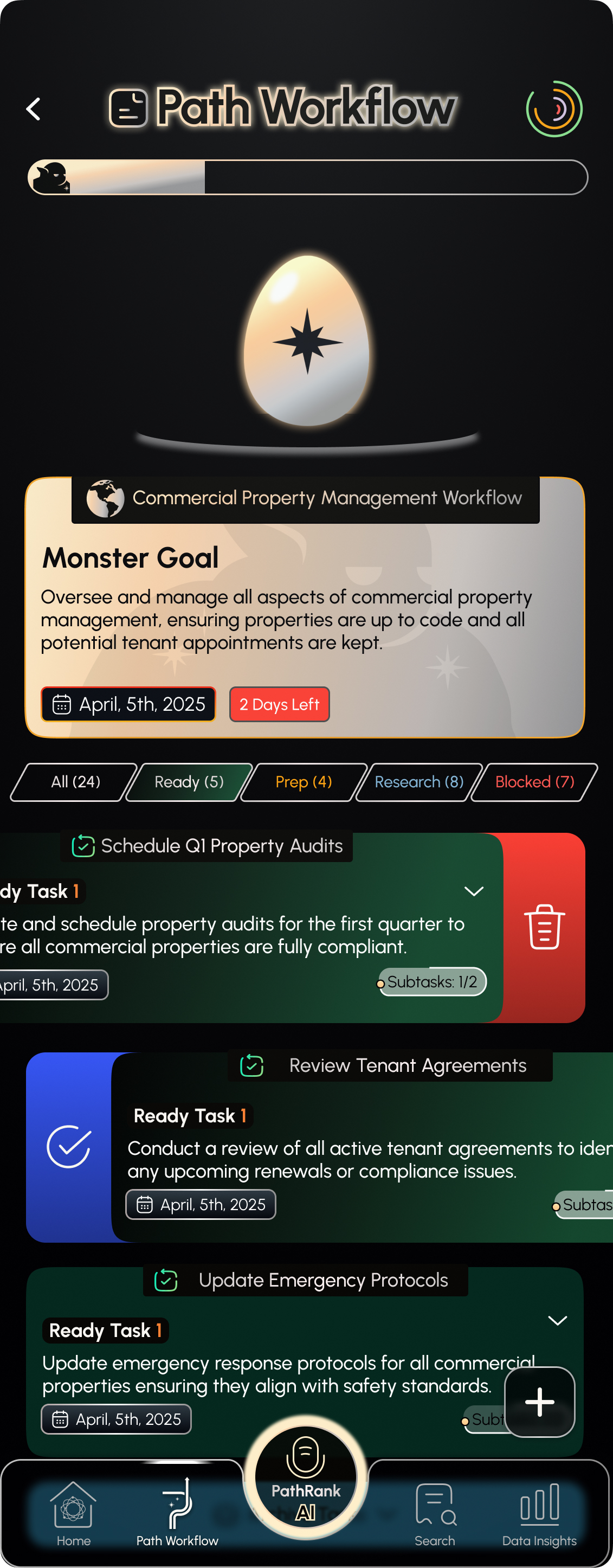
Tap to finish and your ranked workflow is ready
In seconds you get a personalized ranked workflow covering what to do in what order and by when. It never stops at notes. It hands you the plan.
Paste it in, or just type it out.
PathRank pulls out the real to-dos and ranks them into a workflow in seconds.
mon standup - launch week 🚀
brain dump before i forget:
- go thru all the weekly notes + mtg minutes
- someone analyze every product page, flag blockers??
- ci/cd pipeline still flaky, enhance for the dev team
- review ALL sprint reqs before EOW (don't slip again)
- ping robert re: deploy window
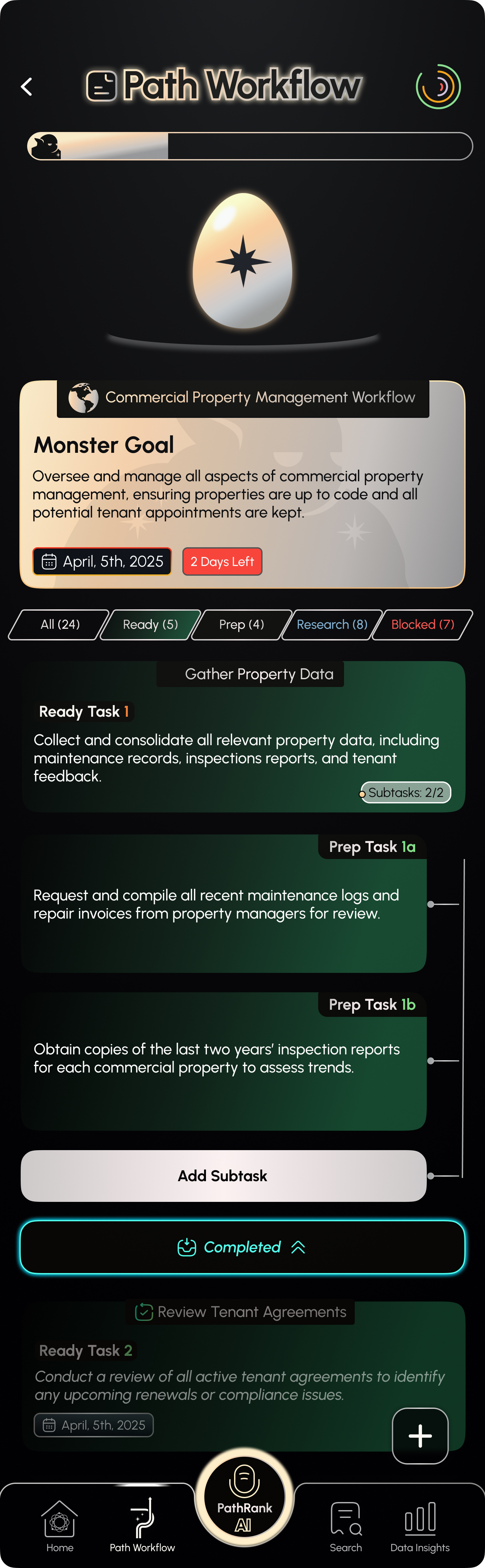 You get a ranked workflow
Every task is ranked, so the next move is obvious.
Only Ready Tasks are actionable, and everything else has to rank up first. PathRank sorts each one into four states so you always see what's real work and what's still waiting.
Ready
The workhorse. Directly actionable, so clear all of them and your Monster Goal is complete.
Prep
Support-level and not ready yet. Needs a bit more before it ranks up to a Ready Task.
Research
A shell task that might matter. Gather more context before it can rank up to Ready.
Blocked
Held up by an outside factor. Resolve it and the task can rank up to Ready.
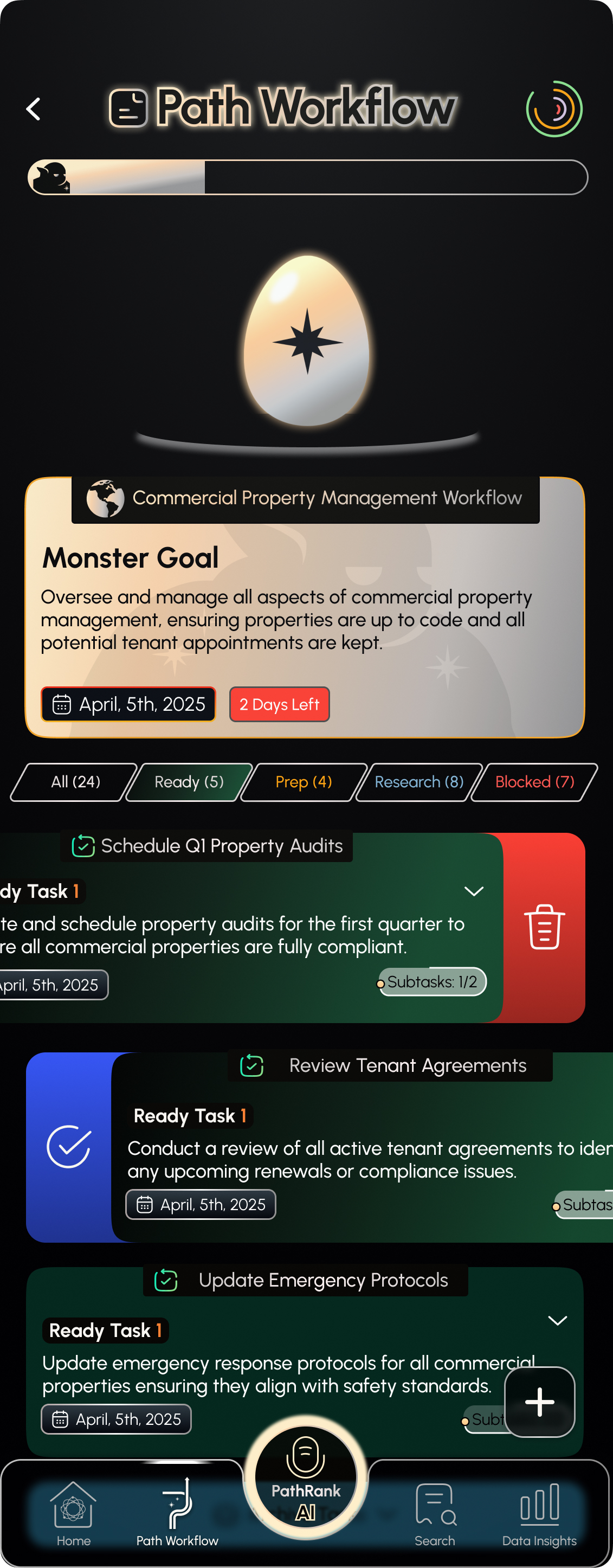
Everything orbits around your Monster Goal
PathRank doesn't hand you a flat list. Every workflow is built around one Monster Goal, with each task ranked by how close it is to being done.
- World
- A Path Workflow, one contained flow of tasks that need to get done.
- Monster Goal
- The World's core thesis (e.g. “Standup for Jun 29th”). Only Monster Goals and Ready Tasks carry real deadlines.
- Ready Tasks
- The actionable workhorses. Prep, Research, and Blocked tasks must rank up to Ready first.
- World complete
- Clear every Ready Task and the Monster Goal is done, so the World is complete.
Swipe right to rank up
Prep, Research, and Blocked tasks aren't actionable until they become Ready Tasks. Just swipe right on any of them and PathRank instantly ranks it up to a Ready Task, with no menus and no friction.
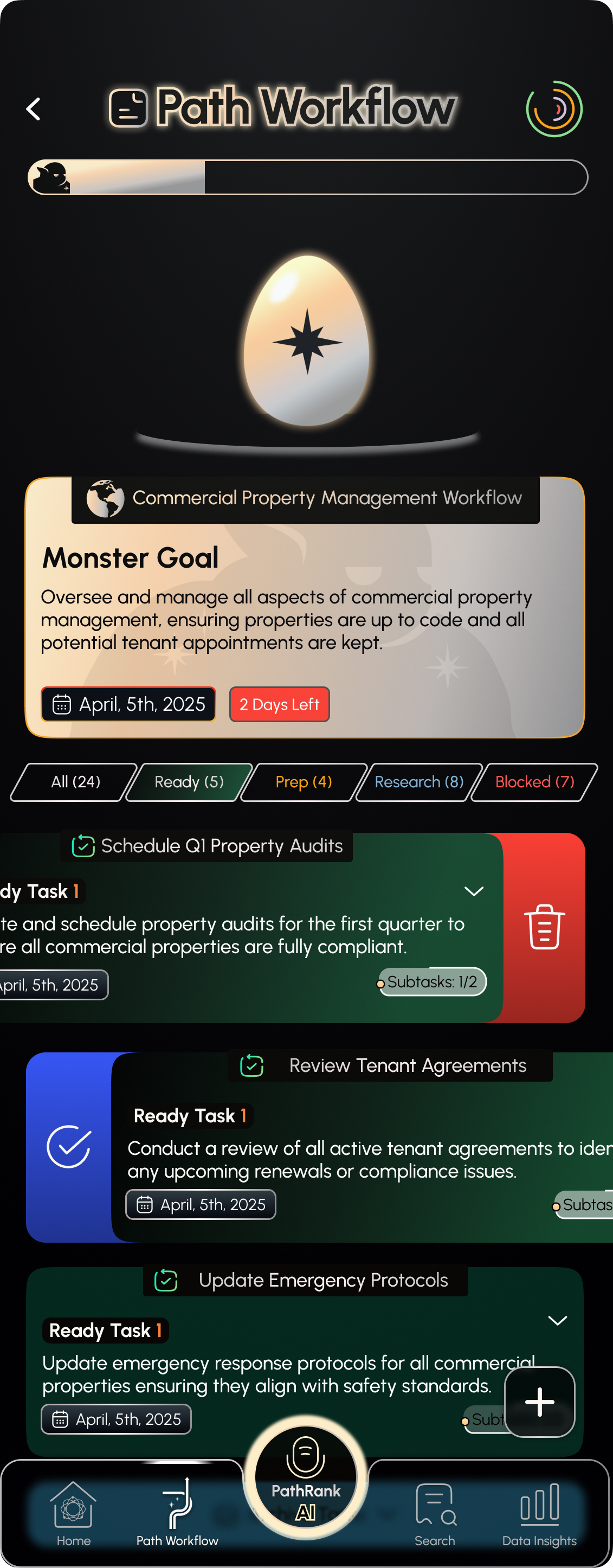
Done means done, and nothing is ever lost
Every task you complete or delete lands in the Completed Section zone. See everything you have finished, recover anything you removed, and clear it for good only when you truly mean to. All with one simple swipe.
Swipe right to complete
Swipe right on any task to mark it done. It drops straight into the Completed Section so your workflow stays clear.
Swipe right again to restore
Changed your mind? In the Completed Section, the same swipe right sends any completed task right back into your workflow.
Swipe left to delete
Swipe left on a task to remove it. Nothing is lost, it moves into the Completed Section as a temporary delete you can still recover.
Swipe left again to delete for good
Ready to clear it permanently? Swipe left on a temporarily deleted task in the Completed Section and it is gone for good.
Quick wins live in your Ready Dock
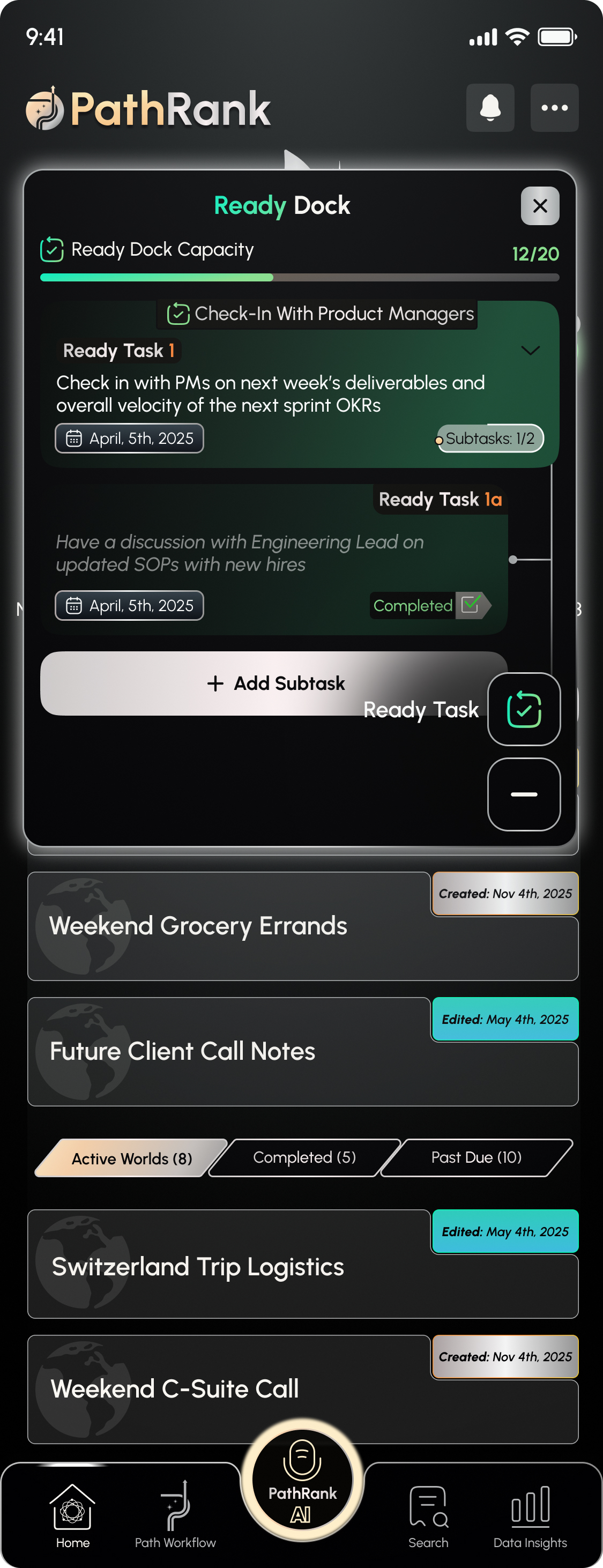
Not everything belongs to a Path Workflow. The Ready Dock is your fast lane for standalone Ready Tasks, a capacity-metered shortlist of exactly what to do now.
Ready Tasks, no World required
Some things just need doing. The Ready Dock holds standalone Ready Tasks that live outside any Path Workflow.
Your at-a-glance do-now list
Every orphan Ready Task in one focused overlay, so the next quick win is always one tap away.
Capacity keeps you honest
The Ready Dock Capacity meter (like 12/20) caps how much you stack up, so the dock stays a shortlist and never a dumping ground.
More than a to-do app. A system for progress.
Voice AI
- Tap the glowing PathRank AI button and talk
- Add a time or detail and it lands on the right task
Paste or type
- Drop in LLM output or your own notes
- Or type your must-dos
- A ranked workflow generates if it is actionable
PathRank Teams
- One Single Source of Truth Transcript per meeting
- A personal ranked workflow for every participant
Ready Dock
- Quick-win tasks not tied to a World
- Your at-a-glance list of what to do now
Advanced Voice Commands
- Long-press the PathRank AI button
- Create edit delete and chain task changes by voice
Data Insights & Search
- Track Monster Goal wins, Ready Rate, streaks, overdue
- Search any task in your account instantly
An accountability layer that makes staying on top effortless.
Track Monster Goal Wins, Ready Task Completion Average, Streaks, and Overdue tasks, and search any task in your account at any time.
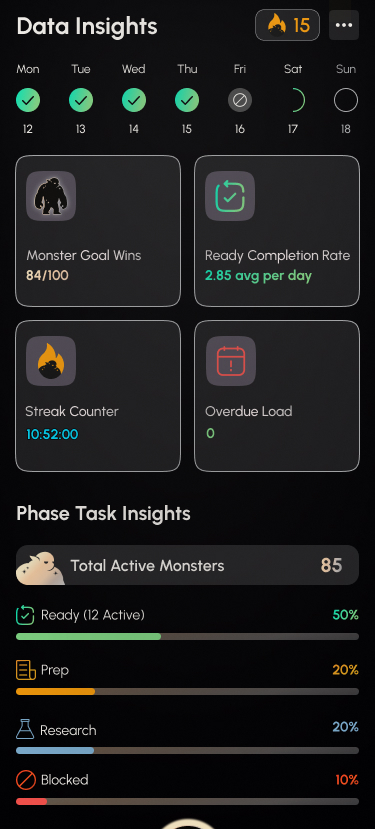
Data Insights
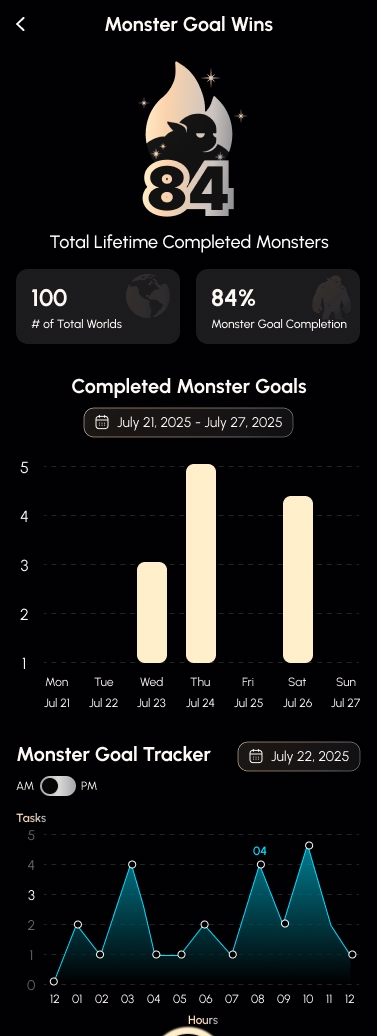
Monster Goal Wins
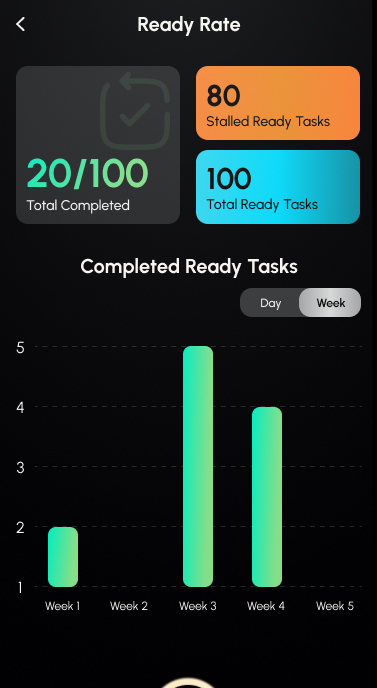
Ready Rate
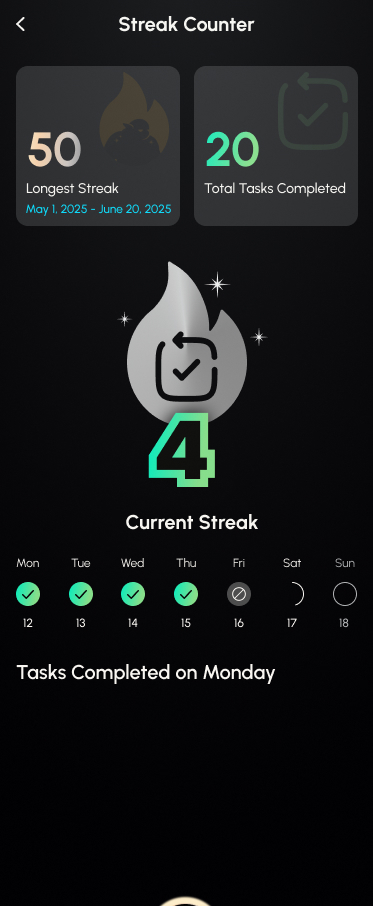
Streak Counter
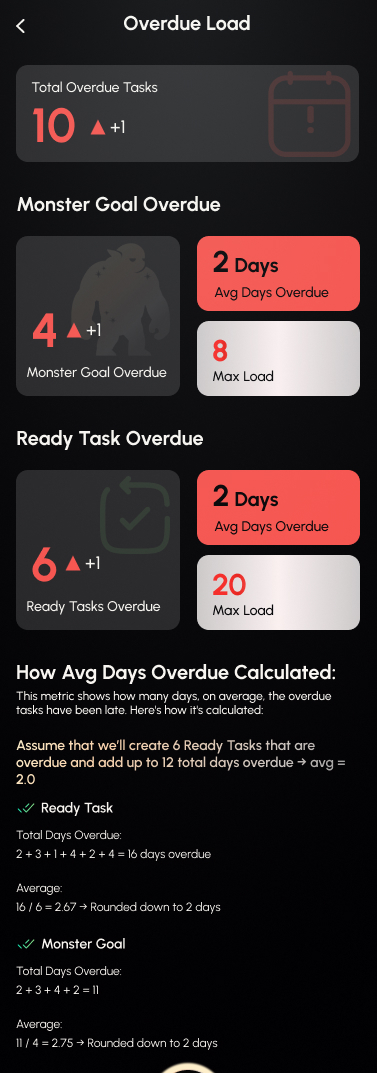
Overdue Load
PathRank FAQ
What is PathRank?
PathRank is a mobile app for iOS and Android that turns meetings, voice notes, and pasted text into a ranked, personalized workflow that actually gets done. Everyone else stops at notes. PathRank takes it the last mile to done, with gamified progress tracking to keep you moving.
How many people can join a Teams session?
Up to 8 invited members join each Teams session. That keeps it a focused working session where everyone is an active participant. When the session ends every member gets their own personalized ranked workflow and the host reviews progress from one view.
How do I turn a meeting into action items for my team?
Run a PathRank Teams session. PathRank transcribes the meeting live and on-device, with nothing to paste and no other app needed, then turns the Single Source of Truth Transcript into a personalized ranked workflow for every participant covering what to do in what order and by when. As the host, you see each member's progress from one view.
How can a team lead see who's executing after a meeting?
PathRank gives the host a live view of every member's ranked workflow, so you can see who's moving and what's stalled. That's execution visibility without status meetings or micromanaging.
What do I do after my AI meeting notes?
Hand them to PathRank and it takes them the last mile to done. Paste a summary, transcript, or action list from any AI note-taker or LLM and PathRank turns it into a personalized ranked workflow covering what to do in what order and by when. Paste is just one optional on-ramp. PathRank can also capture the meeting itself with built-in live transcription, or your voice with a one-tap Solo Session, so it never depends on another tool.
How do I turn meetings and voice notes into a ranked to-do list?
Open PathRank and capture your input by speaking to the PathRank AI button, transcribing a live or recorded meeting, or pasting your notes. PathRank's AI reads the content, extracts only the genuinely actionable items, and ranks them into a personalized to-do list of your Ready, Prep, Research, and Blocked tasks, in seconds. PathRank is a mobile app available on iOS and Android.
Is PathRank an AI task prioritizer?
Yes. PathRank works as an AI task prioritizer: it reads your meetings, voice notes, and pasted text, pulls out the real action items, and prioritizes them automatically into Ready, Prep, Research, and Blocked states so the most important work rises to the top. You act on Ready Tasks first instead of guessing what matters next.
Can PathRank be my AI meeting assistant?
Yes. Transcribe a live or recorded meeting, solo or as a Teams session, and PathRank turns the discussion into action items, then ranks them into a personalized to-do list for each participant. It's an AI meeting assistant that ends with a prioritized plan, not just a transcript.
How do I get PathRank, and what does it cost?
It's live now on the App Store and Google Play. Start with a 7-day free trial, then $14.99/month billed annually ($179.99/year), or $24.99 month-to-month. Change or cancel anytime.
What can I capture from?
Four ways: speak to the PathRank AI button, copy/paste LLM output or notes, type your to-dos manually, or run a live Teams meeting. If there's something actionable in it, a workflow generates.
Does it ever make up tasks?
No. PathRank uses AI sparingly and won't invent filler or hallucinate tasks. If your input has no actionable items, no workflow generates. Ask for support detail, like recipe steps, and it adds those as subtasks of the parent task.
What do Ready, Prep, Research, and Blocked mean?
They're the ranked task states. Ready (green) is directly actionable. Prep (yellow) needs a bit more before it ranks up. Research (blue) is a shell task needing context. Blocked (red) is held up by an outside factor. Only Ready Tasks are actionable, and everything else must rank up to Ready first.
What's a Monster Goal and a World?
A World (Path Workflow) holds a specific flow of tasks. Its Monster Goal is the core thesis of that flow, like 'Standup for Jun 29th.' Complete every Ready Task and the Monster Goal is done, so the World is complete. Only Monster Goals and Ready Tasks carry real dates.
How do Teams sessions work?
Invitees join a whitelisted session by QR code or a unique 6-digit alphanumeric code, locally or remotely. Members can assign each other tasks by name. When the session ends, everyone gets their own workflow, and the host can review members' progress in an admin view.
Is my voice data private?
Yes. In Teams mode, voice registration binds transcription to your specific voice as an allowlist, and your voiceprint is held locally on your device for security.
How does the gamification work?
Complete at least two Ready Tasks in a day to keep your streak, tracked by a reactive streak companion on your home screen. A progress bar tracks your Ready Task completion rate, and your avatar evolves as you finish more work.
Set up your team on PathRank today.
Teams plans start with a 7-day free trial, then $14.99/month billed annually ($179.99/year) or $24.99 month-to-month. Personal use is the entry point. Change or cancel anytime.